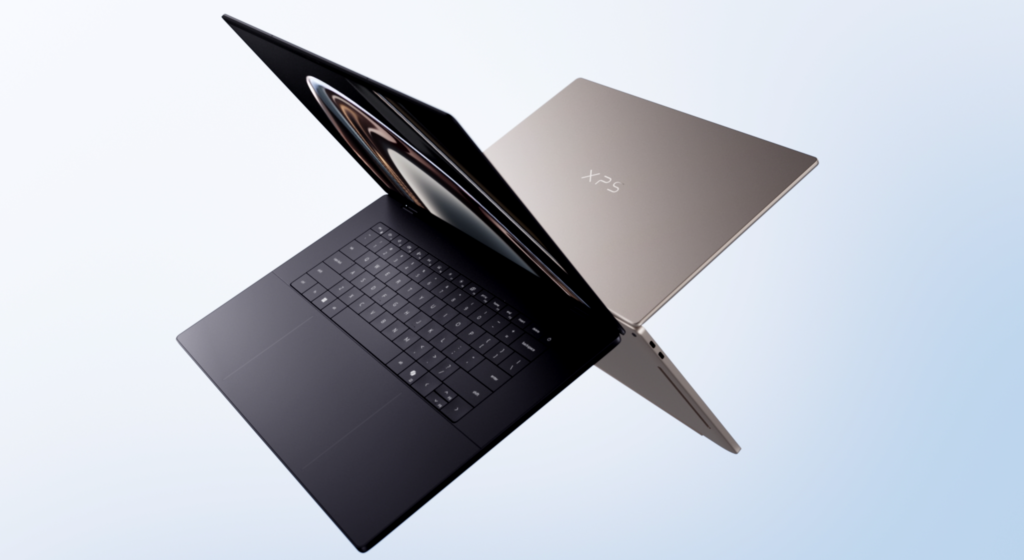

If you’ve followed the XPS line over the years, you know it’s been Dell’s flagship for premium Windows laptops—think stunning builds, gorgeous screens, and that “I just want something that feels right” vibe. But let’s be honest: the last couple of generations had some growing pains. The 2024 model felt a bit experimental with its touch-only function row and polarizing design tweaks, and the 2025 “Dell 14 Premium” (yeah, they briefly ditched the XPS name) left a lot of fans scratching their heads. Enter the Dell XPS 14 (2026)—model DA14260—and it feels like Dell listened, took a deep breath, and nailed the reset button.
This isn’t just a refresh; it’s a full-on return to what made the XPS great, but lighter, smarter, and way more practical. At just 3 pounds and about half an inch thick, it’s Dell’s thinnest 14-inch XPS ever, yet it packs serious performance thanks to Intel’s latest Panther Lake processors and surprisingly punchy integrated Arc graphics. No discrete GPU this time around—Dell bet everything on efficiency, and from what reviewers are seeing, it pays off big time.
Design: Minimalist Luxury That Actually Works
Pick this thing up and you’ll immediately notice how premium it feels. The chassis is CNC-machined aluminum with a clean graphite finish (a lighter “shimmer” option is coming soon), rounded edges for comfort, and that iconic XPS branding proudly back on the lid. It’s not flashy—just elegant and understated, like a modern MacBook Air but with more personality.
Dell fixed two of the biggest gripes from recent models: they brought back a physical function row (no more frustrating capacitive touch bar), and the haptic trackpad now has subtle etched borders so your fingers know exactly where it ends without guessing. The keyboard uses a zero-lattice design with 0.8mm key travel—super low-profile and clicky—but it does take a little getting used to if you’re a heavy typist (some reviewers noted a few more errors than usual). Still, it’s backlit, responsive, and feels worlds better than the old setup.
Inside, it’s surprisingly serviceable for a premium ultrabook: four screws and a spudger get you access to the battery and SSD (both replaceable), though RAM and Wi-Fi are soldered as expected. Sustainability-wise, Dell went hard—75% recycled aluminum, recycled cobalt in the battery, and fully eco-friendly packaging. It’s the kind of detail that makes you feel good about the purchase.
Display Options That Pop
You’ve got two main choices here, and both are winners in their own way:
- Base 14-inch 1920×1200 (2K) IPS non-touch — 1-120Hz variable refresh rate, bright (up to ~466 nits), and fantastic for everyday work. It sips battery like a champ.
- Upgrade 2880×1800 (2.8K) tandem OLED touchscreen — 20-120Hz, inky blacks, vibrant colors (126% sRGB coverage), and HDR that makes photos and videos sing. The tandem tech helps with efficiency and burn-in resistance.
InfinityEdge bezels keep everything immersive, and the OLED version is tuned more for battery life than max brightness (around 355-381 nits), but it still looks stunning. Whether you’re editing photos, watching Netflix, or just scrolling spreadsheets, this screen delivers that premium “wow” factor.
Performance: Zippy Enough for Real Work (and Play)
Under the hood, you’re looking at Intel Core Ultra Series 3 (Panther Lake) chips. Entry-level gets the 8-core Core Ultra 7 355; higher configs step up to the 16-core Core Ultra X7 358H with the stronger Arc B390 graphics. Paired with 16GB or 32GB of fast LPDDR5x RAM and up to 1TB PCIe SSD, it handles productivity, light creative work, and even some casual gaming without breaking a sweat.
Real-world tests show it crushing 4K video transcoding in Handbrake in under 5 minutes on the top model, strong Geekbench scores, and smooth Photoshop/Premiere Pro workflows. The integrated Arc GPU surprised everyone—Borderlands 3 at 36 fps, Cyberpunk at playable frames with upscaling. It’s not a gaming rig, but for a featherweight 14-incher, it’s seriously capable. No throttling nightmares either; it stays cool and quiet under load.
Battery Life: The Real Star of the Show
Here’s where the XPS 14 shines brightest. With a 70Wh battery, the IPS model delivers a jaw-dropping 20+ hours of web surfing in tests. Even the power-hungry OLED version clocks in around 12-13 hours of real mixed use. That’s MacBook-level efficiency without the Apple tax. You can genuinely take this thing on a full day of travel or meetings and still have juice left.
Ports, Audio, and Extras
- Ports: Three Thunderbolt 4 USB-C (two on the left, one on the right with the 3.5mm audio jack). Supports charging, displays, and even Kensington locks. No USB-A or HDMI, so bring a dongle if you need legacy stuff.
- Webcam: 8MP/4K HDR with IR for Windows Hello—sharp, clear video calls.
- Audio: Quad speakers tuned by Waves with Dolby Atmos. Reviewers call them “surprisingly good”—rich, loud, and way better than most ultrabooks.
It’s also a full Copilot+ PC, so you get all the latest AI features baked into Windows 11.
Pricing and Who It’s For
Starts at around $1,599–$1,699 for the solid base config (Core Ultra 7, 16GB RAM, 512GB SSD, IPS screen). Fully loaded with OLED and 32GB/1TB lands around $2,200. It’s premium pricing, but you’re getting flagship build quality and battery life that competitors often can’t match.
Perfect for: Creative pros, students, or anyone who wants a lightweight daily driver that feels luxurious without sacrificing all-day battery or performance. Great Windows alternative to the MacBook Air/Pro if you need that ecosystem.
Not for: Heavy 3D rendering, hardcore gaming, or people who refuse to use adapters for ports.
The Bottom Line
The Dell XPS 14 (2026) isn’t perfect—no laptop is. The keyboard takes adjustment, and the port situation is very modern-minimalist. But it fixes the real pain points of the last few years, delivers class-leading battery life, a beautiful screen, and that signature XPS polish. Dell didn’t just refresh the line—they revived the soul of what made XPS special. If you’re shopping for a premium 14-inch Windows laptop right now, this one deserves a serious spot on your shortlist.